


BandLab – Music Making Studio
4.554.56K Reviews
App Specs
- Version
- 11.27.2
- Updated On
- License
- Free
- Downloads
- 100,000,000+
- Developer
- BandLab Technologies
- Categories
- Music & Audio
- Platform
- Android, iOS
Screenshots
 Analysis by AppCompare
When I assess a mobile music studio, I pay as much attention to the moments that interrupt a session as to the instruments and effects. A good idea can arrive on a commute, between errands, or while I’m away from my usual setup; the useful question is whether I can capture it, find it again, and turn it into something coherent without fighting the app. BandLab is aimed at that kind of flexible music-making, though getting comfortable with a studio on a small screen still takes a little patience.
Where a session can get stuck
BandLab is a music and audio app from BandLab Technologies, and its appeal is clear: I can work on a musical idea from my phone rather than wait until I’m back at a computer. The trade-off is that recording, arranging, and mixing are more demanding than simply playing a track. A touch interface can make it easy to tap the wrong control, and a crowded session is harder to inspect on a phone than on a larger screen.
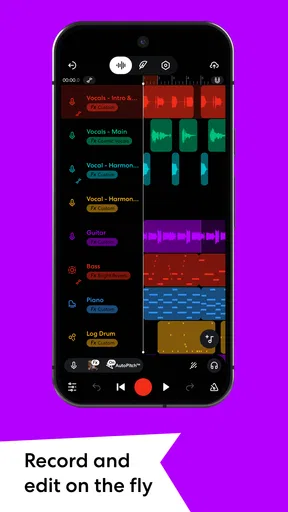
I’d begin with a small sketch rather than trying to build a finished song in one sitting. Record or arrange the central idea first, then add parts only when they serve it. This makes it easier to hear whether a new layer helps, and it gives me a simpler project to revisit if I need to stop unexpectedly. The app’s 16-track editor gives room for layered arrangements, but that capacity is not a reason to fill every track.
A practical snag for new users is knowing what to do next. A recording may sound unfinished not because something is broken, but because the levels, timing, or arrangement need attention. I find it helpful to listen once for the overall idea, then again while focusing on one part at a time. That separation prevents me from making several changes at once and losing track of which one improved the result.
Setup checks before recording
Before starting a take, I’d check the basics: whether the intended input is active, whether the phone is positioned to capture the sound I want, and whether there is enough quiet around me to hear what I’m recording. For vocals or an acoustic instrument, moving away from a loud fan or busy room can matter more than reaching for another effect. A quick test recording is a simple way to catch an overly quiet or distorted signal before committing to a longer performance.
I also like to name or otherwise clearly identify a project while the idea is fresh, and to play it back before moving on. That small habit makes it easier to recognize the right version later, especially when a musical thought turns into several experiments. If I’m using the Looper for a spontaneous groove, I’d settle on the basic pulse first and keep the opening loop simple; a shaky starting pattern can make every layer that follows feel off.
Recovering the creative workflow
When a session stops going smoothly, I try not to respond by changing everything. I replay the last section that sounded right, identify the first point where the problem appears, and make one adjustment at a time. If a new layer muddies the arrangement, muting or removing that layer is a more useful test than adding another effect to cover the issue. This approach keeps the session understandable and helps me recover the original idea.
Worth Reading Before You Choose

Baby Panda World Brings Quick Play to Modern Phones, but Its Game Library Feels Busy

ESPN’s Live Game View Makes Following Close Games Easier

QuizzLand Review: A Good Fit for Short Trivia Breaks, Not Every Player

Basketball Stars: Multiplayer Is Fast, but Can It Recover When Matches Go Wrong?

WEBTOON Turns Phone Updates Into a Better Reading Routine

Link to Windows Runs on Shared Habits, Not Social Feeds
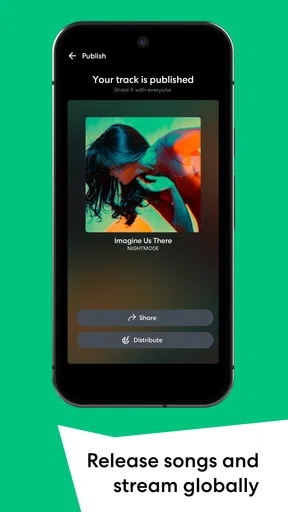
For collaboration, I’d share a clear version of the project or track and explain what kind of response I’m looking for: a melody suggestion, a rhythm idea, or general listening feedback. Broad requests can produce broad comments, while a specific question gives collaborators something practical to react to. The social side is appealing, but it works best when I treat sharing as part of the creative process rather than assuming that posting alone will finish a song.
Getting to Know BandLab
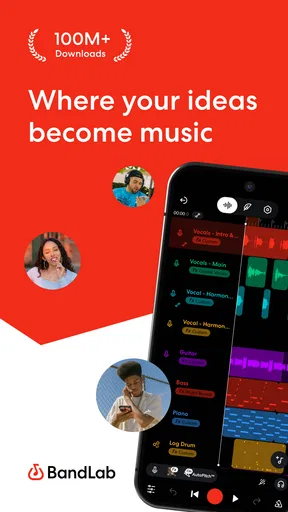
First things first, BandLab is not just any music-making app. It’s a full-fledged studio that lets you create, edit, and share your music right from your smartphone. It’s available on both Android and iOS, so anyone can hop on this musical journey.
Features That Hit the Right Notes
One of the coolest things about BandLab is its multi-track editor. You can layer up to 16 tracks, which is pretty wild for a mobile app. Whether you’re adding vocals, guitar riffs, or some killer drum beats, this app has got you covered.
Another feature that had me hooked is the Looper. For those spontaneous jam sessions, the Looper is perfect for creating loops and grooves on the fly. It’s intuitive and makes you feel like a pro, even if you’re just messing around.
Let’s not forget the social aspect. BandLab isn’t just about making music; it’s about connecting with other musicians too. You can collaborate with people from all over the world, share your tracks, and even get feedback. It’s like a social network for music lovers.
Making a phone-first workflow work
The strongest use case, in my view, is capturing a rough idea before it disappears. Imagine I hum a bass line while waiting for a friend, then later build a beat around it and try a vocal on top. I don’t need to finish the track on the spot; I need a quick sketch that preserves the rhythm and mood. A phone studio is particularly useful for that handoff between inspiration and deliberate editing.
For a beginner, I’d treat the first few sessions as practice with the workflow, not as a test of musical talent. Make a short loop, add one contrasting part, listen back, and notice how the layers interact. This is less intimidating than opening a blank project with the expectation of producing a polished song. The Looper is a natural place to experiment with repeating patterns, while the multi-track approach suits ideas that need separate parts to be adjusted independently.
There is also a useful distinction between composing and polishing. A phone is convenient for choosing a melody, trying a rhythm, or recording a quick vocal idea; detailed editing can be harder when controls and waveforms share a small display. I’d use mobile sessions to make creative decisions and rough arrangements, then move to a larger screen or a dedicated desktop workflow if precise editing becomes the priority. That is not a failure of the app; it is a sensible division of labor between devices.
Who will get the most from it
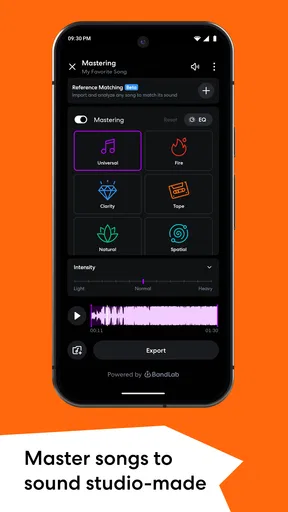
I think BandLab suits curious beginners, songwriters who want to capture ideas, and musicians who enjoy building arrangements from separate parts. It can also suit someone who wants to share work and invite other musicians into the process. Its combination of recording, mixing, production, and social interaction makes it broader than a basic voice recorder or a single-purpose loop tool.
It is less suitable for someone who only wants a simple player, a place to store finished songs, or a no-learning-curve way to record one clean voice memo. A full studio brings more choices, and those choices can slow down a person who has no interest in editing or layering. Likewise, if a project depends on very exact, detailed work, I would not assume that a phone is the most comfortable place to complete every step.
Compared with a basic recorder, BandLab is built around turning recordings into arrangements rather than merely keeping a take. Compared with a desktop digital audio workstation, its advantage is that I can work from a phone and start an idea in the moment; its compromise is the smaller touch-based workspace. Compared with a loop-focused tool, the multi-track editor gives me a way to develop parts beyond a repeating groove, while the Looper remains useful when spontaneity is the point. Which approach is better depends on whether I’m recording a thought, arranging a song, or doing detailed finishing work.
When a problem may be outside the app
If a recording sounds wrong, I would first distinguish between a performance issue and a technical one. Room noise, distance from the phone, an inconsistent playing level, or a source that is simply too loud can all affect the result before editing begins. Listening back with headphones, if available, can make it easier to notice noise or imbalance that was hard to hear while recording. A short test in the same position is often more informative than immediately changing several settings.
If a collaboration feels stalled, the cause may be the handoff rather than the music-making tools. A collaborator needs to understand which version to listen to and what kind of contribution would help. I’d share one clear draft and a focused question instead of sending several loosely labeled experiments. That reduces confusion and makes feedback more actionable, whether the response is about a melody, a rhythm, or the overall direction.
It is also worth separating a creative block from a technical obstacle. If I cannot decide what should come next, adding more tracks is unlikely to answer the question. I’d return to the central hook, remove anything that distracts from it, and take a short break before listening again. If the problem is that controls are difficult to reach or inspect, simplifying the project or continuing on a larger device may be the more practical fix.
Cost, age suitability, and choosing a version
The app is free to install, with in-app purchases listed from $2.00 to $350.00 per item. I’d start by exploring the basic creative workflow before considering any purchase, then decide whether an extra option solves a specific problem in a track I’m actually making. A paid add-on is not a substitute for a clear arrangement or a clean recording, so there is no need to spend just to begin experimenting.
BandLab has a Teen content rating, which is worth keeping in mind for younger users and families deciding whether its social and sharing aspects are appropriate. The app’s average rating is 4.6 from around 773,000 ratings, and it has more than 100 million installs. Those figures suggest it has reached a large audience, but they cannot tell me whether its interface fits my own habits; the best test is whether I enjoy building a small project in it.
The current version is 11.14.3, and the app requires Android 8.1 or later on Android devices. If setup or recording behaves unexpectedly, I’d first check that the device meets that requirement, that I’m using the intended input, and that a short test project behaves as expected. Starting with a simple session also makes it easier to spot whether an issue follows a particular recording setup or only appears in a crowded arrangement.
Why You’ll Love It
Aside from its features, the app’s user interface is super friendly. Even if you’re new to music production, you’ll find your way around easily. The layout is clean, and everything is just a tap away. Plus, it’s free! Yep, you heard me right. All these features without spending a dime.
For those who want to take their music to the next level, there are some in-app purchases available, but they’re totally optional. You can access additional sound packs and effects, which can give your tracks that extra oomph.
Wrapping It Up
After spending some time with BandLab, I have to say it’s a fantastic tool for anyone interested in music creation. Whether you’re a seasoned musician or just starting out, this app has something for everyone. It’s like having a whole studio in your pocket, ready for whenever inspiration strikes.
So, if you’re in the market for a powerful and versatile music-making app, give BandLab a shot. It might just be the missing piece in your creative puzzle. Happy music-making!
My practical recommendation is to try one modest project before judging whether the app belongs in your routine: make a loop or short recording, add only the parts the idea needs, and listen back in a quiet moment. That will show you whether the touch-based workflow feels natural and whether the social and production tools are useful to you. If what you want is a portable place to develop musical ideas rather than a replacement for every studio task, I think it is well worth exploring.
Pros
- User-friendly interface for beginners
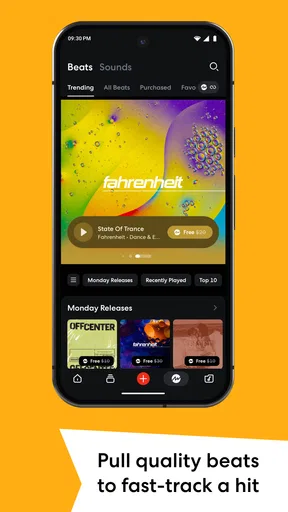
- Extensive library of loops and samples
- Supports collaboration with other musicians
- Cross-platform access via web and mobile
- Free to use with no hidden costs
Cons
- Limited advanced editing features
- Requires internet for cloud storage
- Ads can be intrusive at times
- Lacks some professional tools
- Occasional lag on older devices
FAQs for BandLab – Music Making Studio
What is BandLab and what can I do with it?
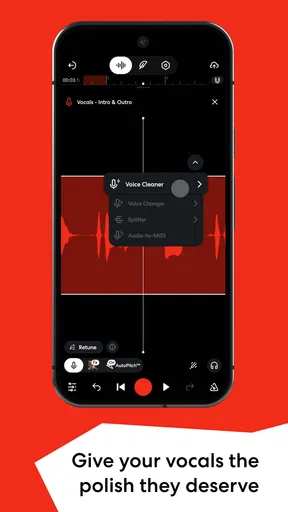
BandLab is a free, cloud-based music creation platform that allows you to create, collaborate, and share music. Whether you're a novice or a professional musician, you can record, edit, and mix tracks using a variety of instruments and effects. It also offers collaboration features, allowing you to work with other artists in real-time.
Is BandLab suitable for beginners in music production?
Yes, BandLab is very beginner-friendly. It offers an intuitive interface and provides various tutorials and guides to help new users get started. The platform includes easy-to-use tools and pre-made loops that allow beginners to create music without extensive knowledge of music production.
Can I use BandLab on different devices?
Absolutely! BandLab is available on both Android and iOS devices, and it also has a web version. Your projects are stored in the cloud, so you can seamlessly switch between devices and continue working on your music from anywhere, at any time.
Does BandLab support collaboration with other musicians?
Yes, collaboration is one of BandLab's standout features. You can invite other musicians to collaborate on your tracks in real-time. This feature is perfect for bands or artists looking to work together remotely, as it allows multiple users to edit and add to a project simultaneously.
Are there any costs associated with using BandLab?
BandLab is completely free to use. There are no hidden charges or subscription fees. Users have access to all features, including unlimited projects, storage, and a wide range of virtual instruments and effects without any cost. This makes it accessible to anyone interested in music creation.


